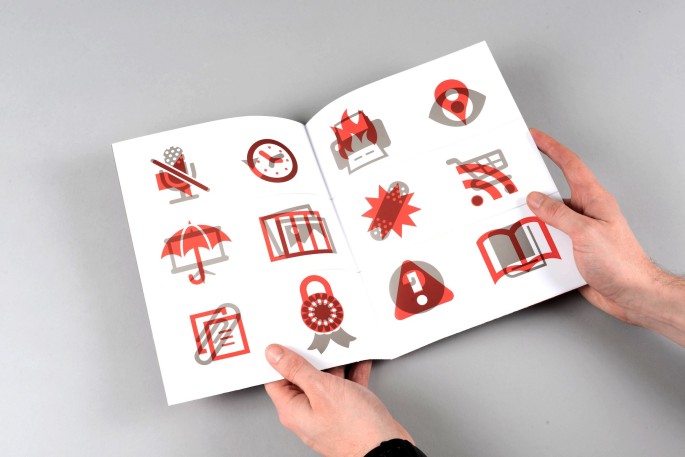
Introducing version 2: Modern Pictograms Pro. The new version adds 130 icons, with half of the originals redrawn for retina. Version 2 is a paid font, with single icons starting at 50 cents.
Modern Pictograms is a typeface for interface designers and programmers. Designed in early 2011 for the Flatfile Wordpress theme, the pictograms stay sharp when used large or small. Install the OpenType file for Photoshop mockups and drop in the @font-face code into your CSS to embed them right in your Web page. Designed to work on web sites at sizes down to 18 pixels, but best at higher than 24 pixels.
Find out more at modernpictograms.com


Thanks everyone for the tweets and positive response. Would love to see the typeface get used… post links below to any projects where we can see the pictograms in action.
This is fantastic! Thank you for making these available. I will likely use U G and , for small activate / deactivate buttons on the release version of this free app: http://partnerpartnerandpartners.com/beerstatus/
Thanks again,
Spencer
Partner, Partner & Partners
slider also appears in Opera
These plus CSS generated content are so full of win.
Are there any relevant standards regarding which character would map to which event the image represents? Like a hotkey mapping? It would be really neat if on a site like wordpress a big chunk of theming was just swapping fonts and all the buttons/icons did the same things. Probably good for ARIA too.
I think I understand what you’re writing. You’re imagining that a theme developer wants to give the user options for various open source typefaces, icons being one of them. It makes sense that any icons made for dynamic use would share the same function. You’re thinking ahead, but makes sense. Not sure where those standards would come from. Unicode is one way it could work, but that’s a bit unfriendly for desktop use. And is there a unicode for iPhone?
Kindof. I’m more thinking of things like SMPTE that has (I think, could be wrong) play/pause as the space bar and longstanding conventions like p for print. I don’t imagine there would be a new enough standard in place to take facebook/twitter into account. It may have to be created. There could be characters reserved in a typeface for new/custom/brand bits alongside a ‘standard’ that paves the cowpaths.
Sounds interesting. Keep me in the loop if you find anything related to this. I’m open to working within a larger standard.
Would love to see some numbers in squares too, or just an empty square font, for designing numbers used for paging.
I believe empty squares can be found in most typefaces. It might require using unicode. Numbers in squares can be achieved in CSS and doesn’t require the typeface to supply the square (or circle).
Beautiful, Thanks for sharing , I think I will be using it a lot.
Confused as how to use this on the web. Sorry if this seems dumb. Can you give me a little background info.
Thomas, I’m happy to explain more. Since Modern Pictograms is a typeface (like Helvetica or Times New Roman), you can load it into your computer (Mac or PC) and create designs in Photoshop or Illustrator with it. So if you type a lowercase “s” in Modern Pictograms, you’ll get a magnifying glass. Just like any typeface, you can change the point size, the color, etc. This is all useful when making mockups for Web and mobile. Perhaps the coolest thing about it, is that you can load the typeface into the browser directly (as I’m doing on this page and throughout this site). That means you can control color and size in CSS. There are advantages to this as far as file size, being able to zoom into them and have them stay crisp and an assortment of production efficiencies.
There is a nice article by Jon Hicks about “how” to implement icon fonts in web pages. There’s a bit of context there, too, if you’re still looking for the “why”.
http://24ways.org/2011/displaying-icons-with-fonts-and-data-attributes
John, thanks so much for a beautiful set of icons! I’m currently doing the Brillist demo and have used your pictograms in each project page and in each new project confirmation page.
If you’re ever so inclined, wanted to make three requests: 1) for a lightbulb icon (= “idea”), for 2) a trophy icon, and 3) an alternate lock icon (like what the Mac OS uses: http://www.brillist.com/lock.png).
Hope you keep this set alive and keep adding to it, and again, thanks so much for what you’ve done so far!
Great idea on a trophy. There is a ribbon there currently if you’re in need. I have a pretty long list of “want to dos”, and will try to prioritize based on need (mine and others). Thanks for the positive feedback overall!
There’s an update to the typeface that includes the lock icon you suggested. See modernpictograms.com
Many thanks John for sharing a great set of icons.
One downside of having good icon fonts out there is that people are going to use them with @font-face. I know that’s kinda the point, but it does create very real accessibility issues. “I used a random character for that icon” is going to be the new “I used an image and didn’t bother with a text alternative”. I wrote about this here: http://fvsch.com/code/icon-font-a11y/
Now I’m clearly not blaming anyone designing an icon font for this. It’s just a broader issue we need to be aware of, and for which there *might* be solutions. For instance we may limit use of such icons to adding icons to visible text labels using CSS generated content; and ideally we should only use existing Unicode values and values from Unicode’s private use code blocks. Sadly I doubt both of these solutions will be used by most, even if endorsed by every single tutorial, icon font documentation page, etc.
We may have a big accessibility issue with no practical solution on our hands.
Thank you for bringing an awareness to mindful use of pictograms within html. I am guilty of “inaccessible” implementation myself on this website. In response to Thomas’ comment yesterday, I linked to an article that suggests using the data attribute when wanting to add a pictogram to a piece of text. When the pictogram stand on their own (like a navigation menu… email, twitter, etc.), they are generally wrapped in an href. Does the “title” attribute (or another attribute) help in understanding the context of the letter used?
Most of the time the title attribute will not be read by a screen reader (with default settings). One exception might be the use of the ABBR element. So you would write e.g. r.
Basically this is the same problem we have with using background-image for displaying icons or buttons. CSS background images were simply *not* designed for that, so when for whatever reason (and there are a bunch of them) the image cannot be communicated to the end user then the user agent (web browser) doesn’t know that something is wrong (it just thinks a decorative image was not displayed, no big deal) and even if it knew it would have no way to try to fix the issue (what text to display instead of the image?).
Compare this with the IMG tag. The user agent knows that if the image doesn’t load or cannot displayed it has a text equivalent: the alt attribute. It’s designed like that in the spec, and the browser knows what to do.
Now @font-face was designed to display custom fonts. If the custom font doesn’t load or is an unsupported format or the user is forcing their own font (e.g. a user with dyslexia may want to use a specific font on all websites)… the browser will just display a fallback font. It doesn’t know that an important information, an icon, was lost. And every trick we imagine to mitigate that will only be a hack accounting for specific use cases. Clever enough hacks may mitigate most accessibility issues, but it doesn’t change the fact that we’re using a technique that was not intended for displaying arbitrary vector images.
Sadly we *are* missing native ways in HTML+CSS to display images, either bitmap or vector, with modern characteristics such as reduced number of HTTP requests, simple HTML code, and ability to substitute a graphic for a text label. And I’m not sure shying away from CSS image replacement techniques or icon fonts (both being inaccessible by design) is a good solution; most web designers and developers will ignore the accessibility issues anyway in order to use admittedly cool features.
I must say, I love your work. There is one icon missing though, the “save” one, which usually looks like a old fashioned disk. Are you considerring creating one of those shortly?
Thank you for the feedback. I have considered a save icon. “Save to cloud” was one version of this. I like the symbol of a “safe” (bank safe). Saving now is less about transferring and more about archiving. As a general reply, I have a list of about 20-30 more that I want to do. I hope to get a 2-week chunk of time to implement them at some point this spring.
How do you use it on a webpage? have never tried this before – only used google fonts API. I uploaded the font to http://www.fontsquirrel.com/fontface/generator but it didn’t work – at least not straight out of the box (the demo page only produced regular font letters). Can somebody guide a noob?
No need to generate the @font-face code, Font Squirrel provides this. As far as embedding that, give this a look: http://nicewebtype.com/notes/2009/10/30/how-to-use-css-font-face/
I recommend everyone use the below css declaration for sizes under 30px:
-webkit-font-smoothing: antialiased;
Accessibility aside, have you guys considered releasing a @font-face version that maps the characters to more “neutral” entities in the unicode stack? I know in my case it would be a lot more graceful for the MP icons to “fall back” to the various bullet/star/etc entries when webfont or CSS compatability fails. Just an idea
Matt, yes, we’re hosting Modern Pictograms at http://shifticons.com to do just this. There is a cost per pictogram to use the Shifticons service, but it’s pretty small.
Hi
I’m the designer & co-founder of API Engine (http://apiengine.io) and I’m using this excellent typeface extensively throughout our site (donation coming shortly
During the design process I found myself needing an open book pictogram and wondered, do you have any plans to add an open book pictogram to this set?
Thanks for taking the time to bring this to the community at large for free. Excellent work people…
Thank you for your response. There will be an open book pictogram in the Pro version of the typeface, to be released very soon by The Noun Project (in svg) and Shifticons (as @font-face)
I am having some issues using the font and I am not sure what exactly the problem is. Perhaps someone with more knowledge than me could give me a hand. I have the following in my CSS:
.p1 {
font-family: ‘ModernPictogramsNormal’;
src: url(‘modernpics-webfont.eot’);
src: url(‘modernpics-webfont.eot?#iefix’) format(‘embedded-opentype’),
url(‘modernpics-webfont.woff’) format(‘woff’),
url(‘modernpics-webfont.ttf’) format(‘truetype’),
url(‘modernpics-webfont.svg#ModernPictogramsNormal’) format(‘svg’);
font-weight: normal;
font-style: normal;
}
and I am using the “p1″ class in my html. I am using “p1″ as a paragraph tag to test out the font and get it working before implementing it on my site. Mind you I am an amateur creating a site for a small company for review and modification. Is there something that I am missing. I assumed (most likely incorrectly) that once the CSS was correct, the font would be identified by my browser (Chrome) and show on the screen. Is there some type of file upload I missed? Thanks for your help, I love the font-icons, and would love to donate to the project, I just can’t seem to get it to work. As a reference, I am using wordpress.
Phillip, you need to have two declaration blocks in your CSS. The first one should be an @font-face { … } declaration block. What you pasted in the comment is essentially that, but you have .p1 instead of @font-face. Once you define the font-family name you need a second declaration block that calls in the font-family. So .p1 { font-family: ‘ModernPictogramsNormal’ } would be that.
So you’re almost there. Good luck!
Is there some type of file upload I missed? Thanks for your help, I love the font-icons, and would love to donate to the project, I just can’t seem to get it to work
You can donate here… https://www.paypal.com/cgi-bin/webscr?cmd=_s-xclick&hosted_button_id=A78FM679JWHE4
thanks for the great vectors!
I’m the designer &founder of Web Develover IT and I’m using this excellent typeface extensively throughout our site (donation coming shortly During the design process I found myself needing an open book pictogram and wondered.
There is an open book pictogram coming in the Pro version. Stay tuned!
I’ll be using this typeface on my current client’s website development. I’ve incorporated a $40 charge for the great typeface and I will be sending that your way as soon as my client pays. Thanks!
Many thanks to the John, this font is plain awesome. Although i feel the need of a symbol, the “chain hyperlink” one. If you put it there you are awesome if not, you are awesome anyway
100+ additional pictograms to be released in the “pro” version this coming January. A chain link is in there!
Just a quick comment to let you know how awesome Modern Pictograms is. Great work and I’ve personally included it in the “The Most Comprehensive Maintained List Of Free Iconic Web Fonts” found here – http://www.functionn.in/2012/11/the-best-free-iconic-web-fonts.html
Cheers!
Thank you for letting me know!
Will the twitter icon be updated per their branding guideline?
Coming shortly in the Pro update.
The new version of Modern Pictograms is available and has the updated twitter icon. Visit modernpictograms.com
Great work! May i ask if the version 3 is included in the updates or not.Thank you.
The plan is to add about 50 icons over the course of version two. There may never be a version three. Or version three might be structured differently. In short the free updates will get you pretty far into the future.
You’ve just convinced me to buy, thank you John!